
We rightfully assumed it should be due to dirty internal optics, and had the scanner cleaned at Nikon service center (the store paid $250 for this job). The scanner now works like new:
Though the Nikon example above is truly horrible, all brands of desktop film scanners are susceptible to dust problem. To keep them from degrading image quality, you may do these steps:
Quality and cleaniness of scanner optics is more critical than
that of camera lenses. That's because the image on film has much larger contrast range
than the original scene. A contrast range of 1:50 in the original scene may be mapped
into a density range of 1:1000 on the slide. This makes the slide more vulnerable
to flare in scanner optics.
 This is a scan from negative film done on the same dirty scanner as above slide scan.
The effect is less noticeable (negative film is less contrasty medium) and unusual:
there is dark flare around dark objects, which are more transparent on the negative.
This is a scan from negative film done on the same dirty scanner as above slide scan.
The effect is less noticeable (negative film is less contrasty medium) and unusual:
there is dark flare around dark objects, which are more transparent on the negative.
This resulted in soft look. This is not necessarily bad for portraits. With slides, you could use soft filters on the lens and get effect similar to flare in dirty scanner optics. There is, however, no physical equivalent of the flare effect obtained with negative scans.
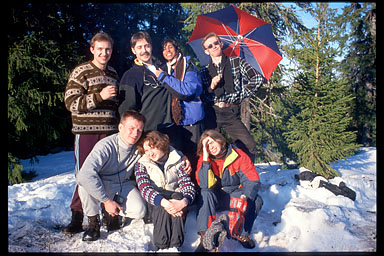
Yes, this is unfortunate owner of the scanner -
my friend Albert Lysko - on the picture.
He and his wife were only scanning negatives and
didn't notice anything wrong until I came to
scan some of my slides.
|
The next two fragments of negative scans were sent me by Scott Squire (ssquire@mail.cmsfq.edu.ec) from Ecuador. When he eventually disassembled his |

|

Another example, with before and after scans (scroll down). |

|

|
With slide film, you should look closely at dark parts of the image adjacent to
bright objects. Make sure your monitor is properly adjusted, or you may not see the dark tones. If your room is brightly lit, it may also hamper viewing dark parts of the image (essential for some examples below). |
|
Now that you've seen few examples,
can you tell by this image if those PhotoCD operators
did bother to keep their scanner completely clean?
I feel they didn't. |

|

|
There actually is another kind of flare not related to scanner optics and dust - CCD leakage.
Bright areas on slides and dark areas on negatives smear along the CCD line,
i.e. along the short side of the frame only.
CCDs in old models of scanners were prone to it.
This is a PhotoCD scan from slide (I call this particular slide "Scanner's death" :-). Flare on this scan is a combination of short halo around white area (scanner optics, probably) and CCD leakage, very noticeable in the dark sky above the white balloon. There was no flare on the original slide. The lab sucked, anyway. Another example of CCD leakage (on CanoScan FS2710). |
|
There may also be defective pixels in your CCD, dust laying on the sensor or some other kind of irregularity
in the CCD line. In this case, streaks run across the image along the scan direction,
i.e. parallel to the long side of the frame.
See examples (from Minolta Dimage Scan Dual II,
Acer ScanWit 2720S and some flatbed scanners).
Nikon has advice on how to recognize the cause of streaks.
Streaks can be also caused by dirt in other parts of the optical system, e.g. on the illuminator bulb (scan from Minolta Dimage Scan Multi, medium-format slide). |

|

|
The cause of irregularities running along the scan direction may be not acquired defects, but characteristics of the sensor and/or readout electronics.
If you look at the large version of the photo to the left, you can notice vertical bands in the sky and in the dark water (look carefully... the bands may be barely noticeable).
This scan has been made on a good Nikon With an older and cheaper HP Photosmart scanner, a problem of this kind is much more visible. |
Still not sick of scanning artefacts? Check
If you scanner is not listed above, this does not mean it is free from these problems. They are inherent to the desktop scanners technology, and not necessarily can be eliminated by a proper design.
In the end, I hope this article wouldn't put you off scanning your pictures. Look at imperfections realistically.
P.S. If you still can't tolerate any compromise whatsoever, you can always have drum scans done of your slides (very expensive but near-perfect).
Thank you very much for your explanation about "dirty scanner optics". I had the same problem. I have a Coolscan LS-2000 and when I scanned my films and slides everytime I had flare. Looking for this problem at Google I found your page and then I knew what's the problem. This morning I called Nikon Service Center in Spain, where I live, but they didn't say me how much it costs me the cleaning of scanner. So finally I opened the scanner. It had a film of dust over the mirror and I cleaned it carefully. Now the scans are perfect. The operation took me one half hour and I saved the cost of reparation.You can visit my Web page and see there are many images with this problem, that I tried to correct with Photoshop. I will re-scan these images...
-- Fran Fernandez (franlance@menta.net), November 22, 2001
Thanks for the article. It helped me to diagnose my deteriorating scans with myLS-2000. I followed the Camera911 instructions and cleaned the scanner myself. It turned out that a dirty bottom mirror was the culprit. After cleaning, the scanner scans like new.
Here's a tip. Don't position your
LS-2000 vertically. This allows any dust and dirt entering through the slide/negative adapter to drop onto the mirror. Position the scanner horizontally, so that the door slides left to right. This way, gravity won't work against you.
-- Gary Jean (gary.jean@us.army.mil), February 18, 2003
After cleaning the optics on my Nikon LS-2000 using the Don Doucette procedure, it produces excellent scans again. If taking the time and effort to disassemble the scanner to clean the optics, you might as well perform the Nikon LS-2000 Lubrication Guide by Phil Lee.Nikon scanners use small Philips head screws that can be difficult to remove. These screws are Japanese Industrial Standard (JIS) and are shaped differently than US Philips screws. In particular I could not remove the flathead screws without the required JIS Philips screwdriver (size #0). Regular screwdrivers will tend to camout (i.e., lift out) and strip the screw. If you strip a screw, you are in big trouble. Hozan makes a quality set of JIS screwdrivers.
— Brad Simon (simonbh@sbcglobal.net), January 26, 2011
I can’t thank you enough for the on-line illustrated instructions on teardown and cleaning of the Nikon LS 2000 scanner. It was absolutely critical helping me get my unit running smoothly again. I found I did have to drill out the three flathead screws (differing from the other round head screws) that hold some of the stamped steel frame members together as they were socked down with extreme torque and a screwdrive would not work. I DO NOT recommend doing this unless one is very familiar with this somewhat risky method. I have experience and the proper tools to remove screws such as these. It’s NOT for the faint of heart or the inexperienced. I’m also fortunate I have a local source of miniature metric size screws so replacement was easy.The scanner is now working as new. And of course I’ve learned a hair-raising lesson here. Never again will I allow dust to build up inside my precious film scanner. I also recommend anyone with these trying to get them to work with newer operating systems to simply fork out the $40 (US) for the VueScan software. It will save a great deal of frustration if you are trying to get Nikon’s ancient drivers and scanning software to work (in my case with Windows XP). Nikon was renowned for its poorly designed software in the era these scanners were manufactured as the Japanese electronics industry in that time was highly secretive and proprietary (perhaps they still are?). Nikon especially did not want to work openly with software engineers outside the company and the scanner’s software reflects that attitude in its poor design. So, go with VueScan and save yourself a lot of lost sleep!
— Paul Peck (paulpeck@orcalink.com), September 18, 2011
Thank you for these pages: they were spot on to my problem. I’ve had the scanner in storage for 5 years and who knows how long before that has it been collecting dust? All my scans were foggy to the point I wanted to throw it out and buy another scanner. Only the price of a new one made me reconsider. Lucky me I found these pages and followed the procedure. Now the scans are so crisp, my retina is bleeding when I look at them. Only now I realize how much dust I have on slides themselves. Before it was hidden in the haze.Regarding the JIS #0 screws that Brad Simon comments, indeed they may be a problem. I was lucky I had previously bought a kit with 40 different drill bits to accompany my cordless drill. One of those bits fit perfectly, incidentally it is marked as #0, so it is probably a JIS.
My biggest problem was that I didn’t know how to clean the mirror once I reached it. I did use an air can, but the dust film was too much for it. Then I used a Q-tip with nothing on it, and I ever so gently got out the dust, but seen at an angle it was obvious smudges were left on the mirror. I read that one has to be careful what is using for cleaning, in particular no abrasion and no alcohol. So, out of ideas I went to the nearest photo supply store in my neighborhood. I found it closed. It’s been closed for more than 2 years. The digital era put them out of business. Damn, I still have film I got from those guys and it is excellent! Next photo store, also out of business. So I googled and found another, called and verified they are still in business. Once I reach them, they tell me that I should probably use a lens cleaning solution and a lens cleaning microfiber cloth. Whole kit (with other extras on top), about $7. Worked like a charm.
— Adrian Grajdeanu (grajdeanu@terralign.com), September 21, 2011